 VS Code extension · v0.1.6
A full-featured SQLite editor, right inside VS Code.
Click any .db file and browse, edit, query, and export it in place. Think phpMyAdmin, but for SQLite. No native dependencies, no telemetry. Free.
- Free
- No telemetry
- Zero native deps
- Win · macOS · Linux
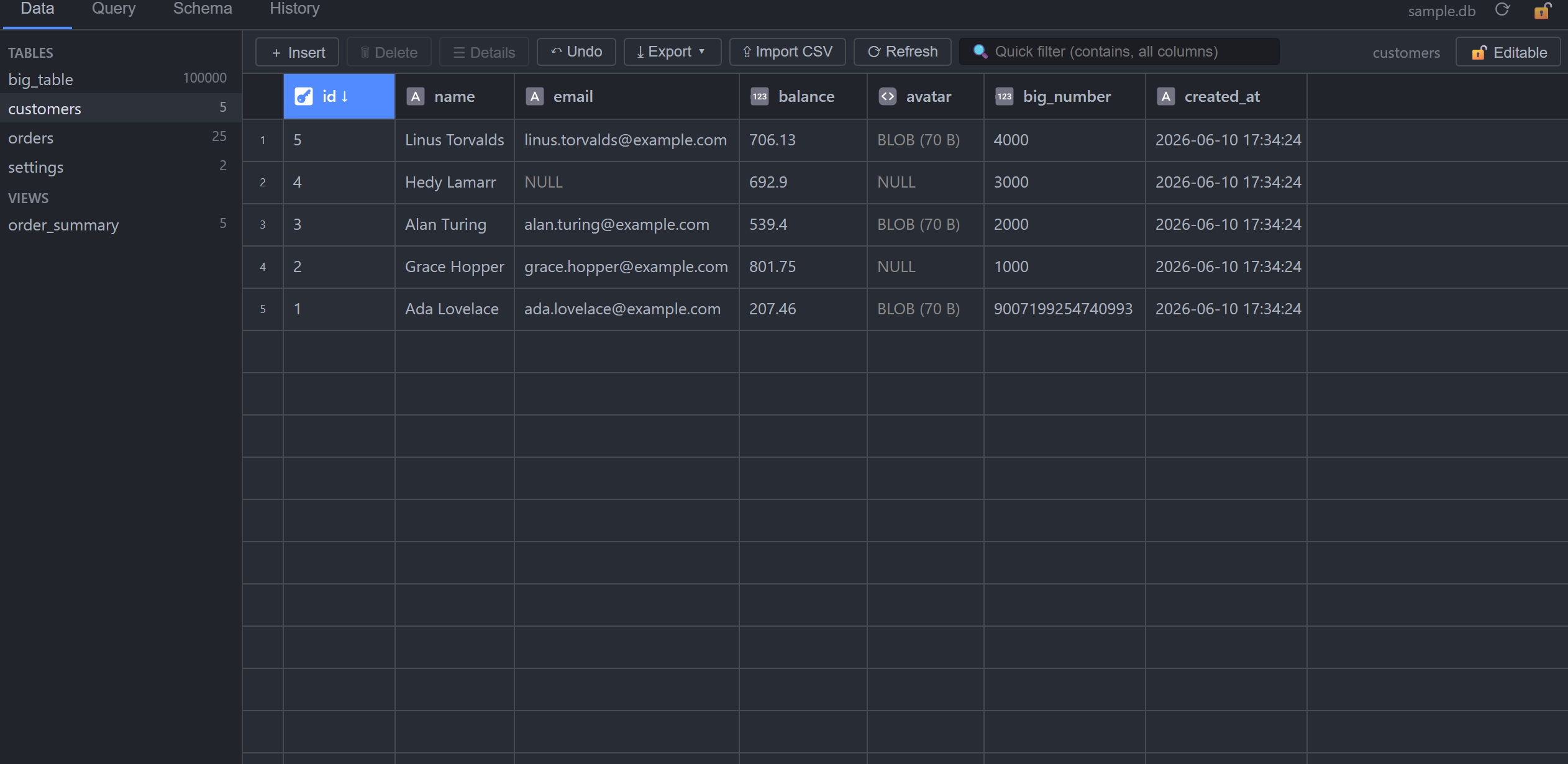
A real editor, not just a viewer.
It just works
SQLite runs as WebAssembly with file I/O through a Node VFS. No native binaries, nothing to compile, no “module failed to load”. Identical on Windows, macOS, and Linux.
A true editor
Inline cell editing, row insert / delete / duplicate, CSV import, a SQL runner, and undo. Every editing feature is included, and it's all free.
Fast
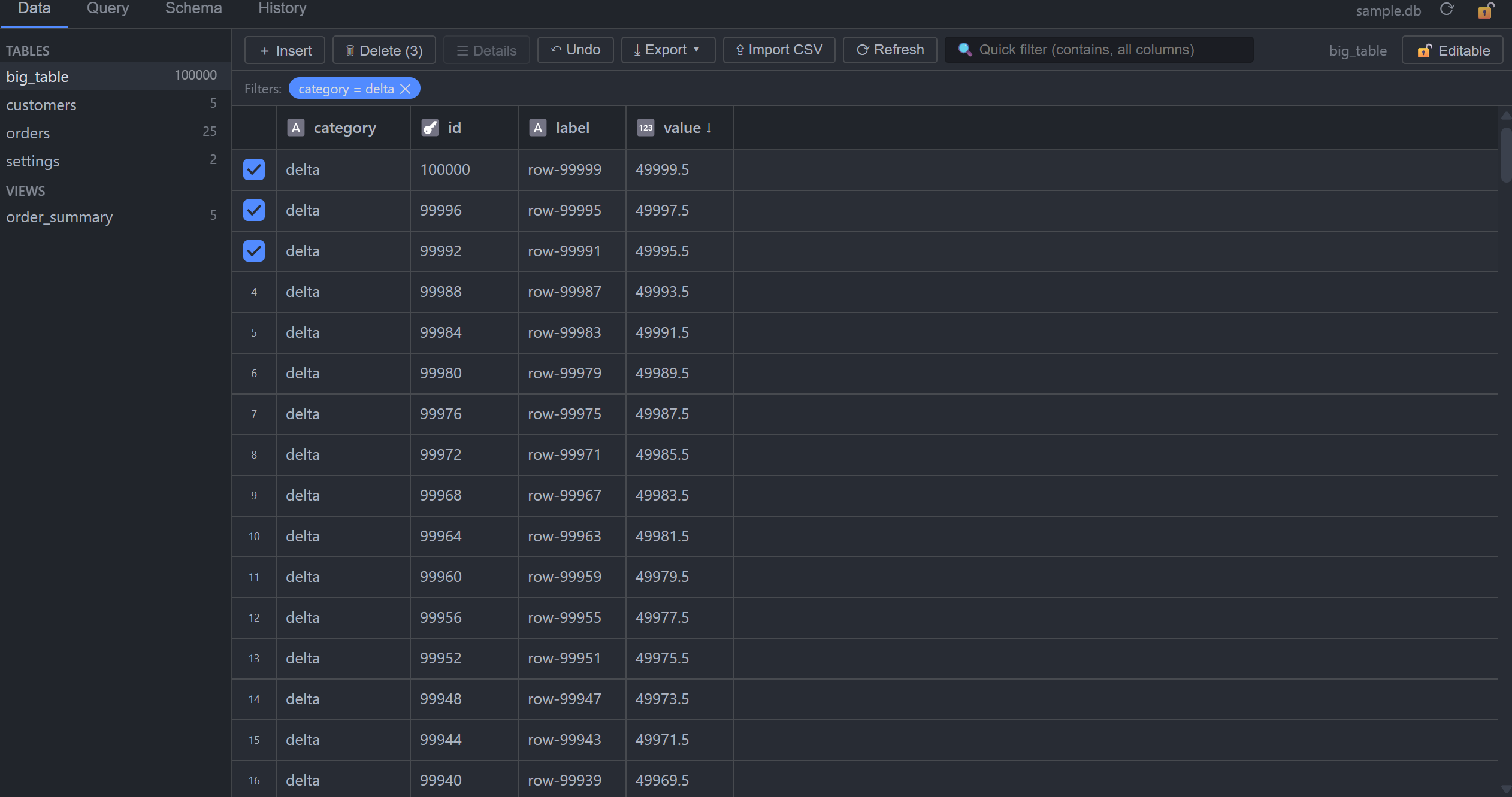
A canvas-rendered grid handles 100k+ row tables smoothly, with virtualized scrolling, sorting, and paging. Writes go to the file page by page, so big databases are never fully loaded into memory.
AI-ready
Copy a whole schema as Markdown, or export any table as a SQL dump, ready to paste straight into your favorite assistant.
Private by design
No telemetry, no tracking, no network calls. Your databases never leave your machine.
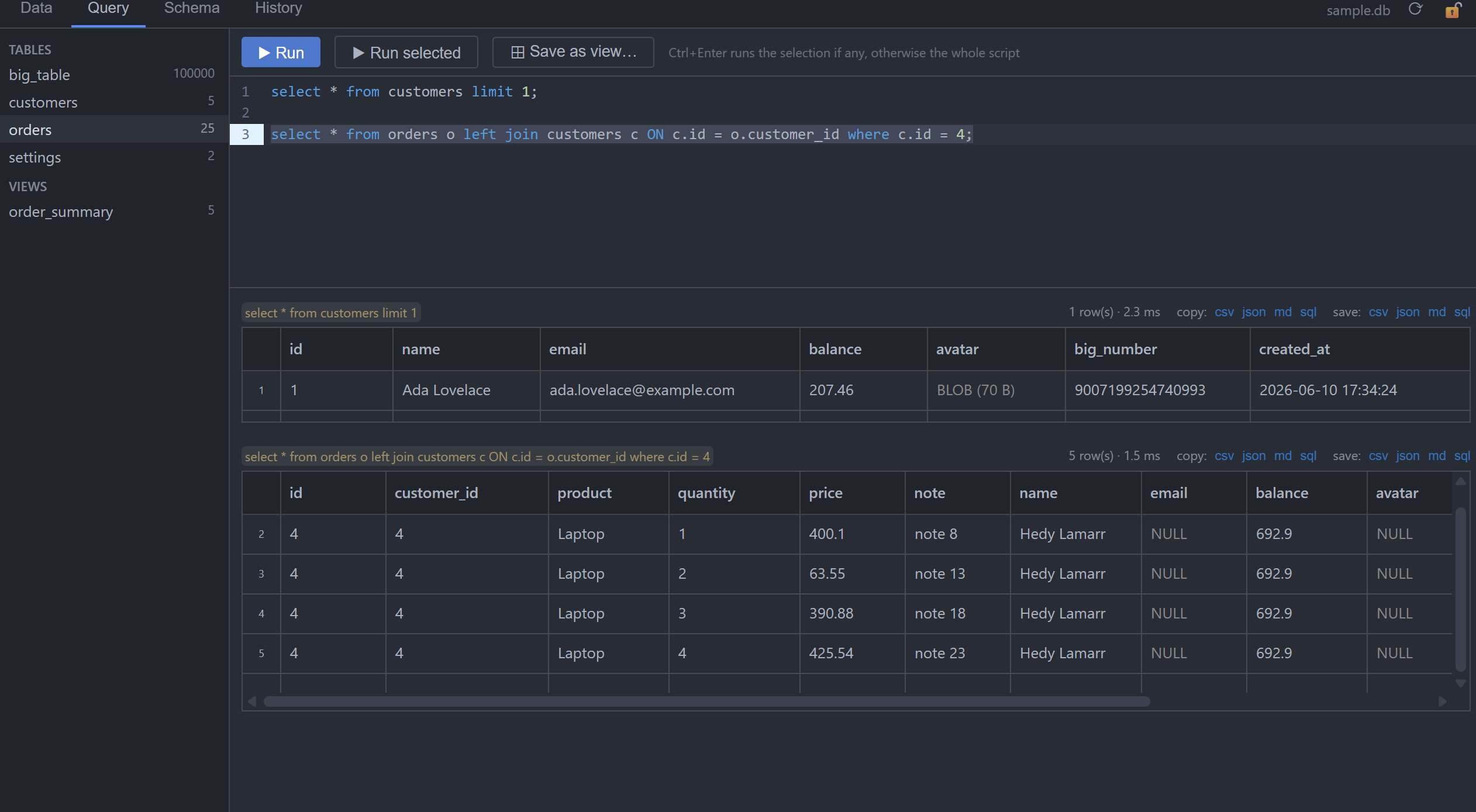
See it in action.
Everything, included.
Twelve things SQLitePad does, all free.
Open by clicking
.sqlite, .sqlite3, .db, .db3 and .s3db files open directly in the editor, with no command-palette dance.
Full editing
Inline cell editing with type-affinity coercion, insert via a form panel, delete, set NULL with Del. Every change is committed immediately and transactionally.
SQL query runner
CodeMirror editor with theme-aware highlighting and schema autocompletion; multi-statement scripts, run-selection, per-statement timings; save a SELECT as a view in one click.
Filters & quick search
Per-column filters (=, contains, ranges, NULL/empty), right-click a cell to filter or exclude, plus a debounced box searching every column.
Foreign-key superpowers
Filter an FK column by searching the referenced table by name; jump to the referenced row; FK autocompletion in insert forms; preview columns remembered per database.
Import & export
Import CSV into tables (header matching, preview, single transaction); export tables or query results to CSV / JSON / Markdown / SQL dump, either to a file or the clipboard.
Undo & history
A session audit log showing old → new values for every change; undo with Ctrl+Z or from the History tab. Updates, inserts and deletes are fully reversible.
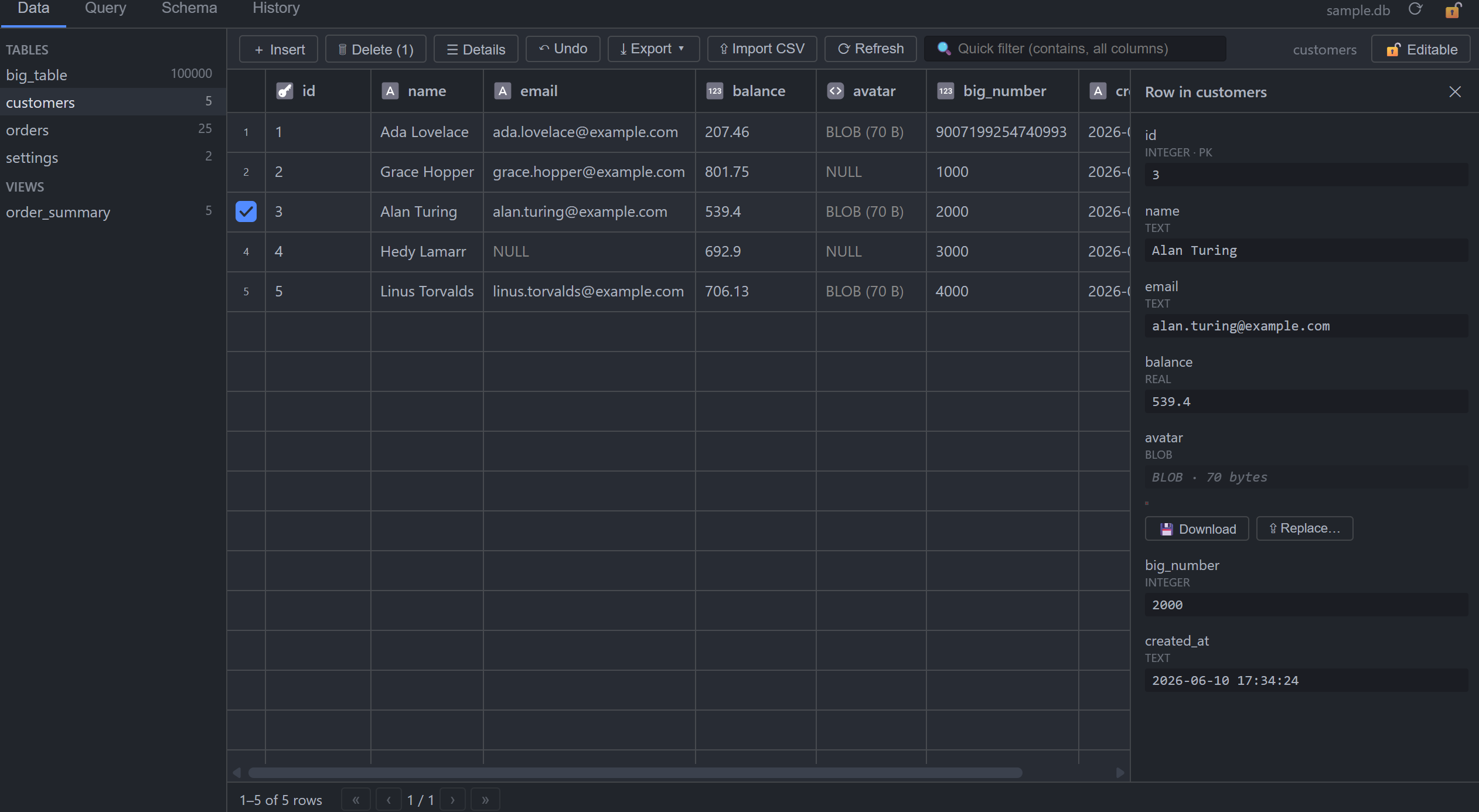
Row details
A vertical field view for wide rows, JSON pretty-printing, BLOB hex preview with image detection (PNG/JPEG/GIF/WebP) plus download/replace, and inline FK previews.
Schema view
Columns, primary keys, foreign keys, indexes, and pretty DDL. Copy the whole schema as Markdown.
Safe with shared databases
Read-only is enforced at the file-system level, so a read-only session is invisible to any other program using the same file. Databases in use elsewhere open read-only, deletes are all-or-nothing, and an outside change shows a refresh banner.
Remembers your layout
Column widths, pinned columns, and FK preview choices persist per database. One command resets it all.
Yours to tune
Page size, open-as-read-only by default, and single-row delete confirmation are settings. Refresh, New Query, Export and Read-Only sit in the editor title bar and the Command Palette.
Getting around.
| Action | How |
|---|---|
| Open a database | Click the file in the Explorer |
| Sort | Click a column header (asc → desc → off) |
| Edit a cell | Double-click it, type, Enter |
| Set NULL | Select cell(s), press Del |
| Insert a row | Toolbar + Insert |
| Delete rows | Select via row markers, press Del |
| Run SQL | Query tab, Ctrl+Enter |
| Save query as view | Query tab → Save as view… |
| Filter via a foreign key | FK column header ▾ → search the referenced table |
| Lock the file | Toolbar 🔒 Read-only or the title-bar icon |
| Copy cells | Select, press Ctrl+C or right-click → Copy selection |
| Reset the layout | Command Palette → SQLitePad: Reset Layout for This Database |
Where the edges are.
- !
A database that another program is using (WAL mode, or -wal / -shm / -journal files next to it) opens read-only and cannot be unlocked from inside the editor. The WASM VFS has no shared memory, so SQLitePad never competes for the write lock.
- !
Editing needs a row identity: tables with a primary key or a free rowid alias are editable; views, and tables where rowid, _rowid_ and oid are all user columns with no primary key, are read-only.
- !
BLOB values are viewed and replaced through the row detail panel, not inline in the grid. A NULL in a BLOB column is filled only via Replace…; text stored in a BLOB column stays inline-editable.
- !
Text values containing a NUL byte are cut at the NUL by the WASM SQLite binding, in the grid and in exports. The bytes on disk are never touched.
- !
Not yet available in VS Code for Web; it reads and writes files directly on disk.
What's shipped.
- Rows are addressed reliably even when a table has its own rowid, _rowid_ or oid column; editing a primary-key value no longer breaks the row.
- Deletes are all-or-nothing and refuse a stale selection; cascading deletes are recorded as not undoable; History records a change only once it is committed.
- Query tab: WITH … INSERT/UPDATE/DELETE and PRAGMA writes go through the write path, RETURNING rows are shown, results are capped at 10,000 rows with a notice.
- Big tables: edits no longer re-read every schema or re-count every table, the 30-second timeout is gone, and a locked database is reported in half a second.
- New settings (page size, default read-only, single-row delete confirmation), title-bar icons for the four commands, keyboard-navigable sidebar, Escape closes panels.
- CSV delimiter is detected from the header, exporting selected rows works for any count, save dialogs open next to the database, copy cells with Ctrl+C.
- Switching tables quickly no longer shows the wrong table's rows, and an edit is never sent against the wrong table.
- A Query script that leaves a transaction open is rolled back automatically with a notice; deleting a cell range runs as one transaction with one undo.
- CSV import decodes UTF-16 via BOM and frees memory when a preview is cancelled; large BLOB previews are capped at 64 KB, images up to 2 MB load automatically.
- Exports under an active search select exactly the shown rows; the detail panel's Go to link opens the target table filtered to the referenced row.
- Read-only is enforced at the file-system level: no -wal or lock files are created, written, truncated or deleted, so a read-only session is invisible to every other program using the database.
- Fixes a Linux case where closing the editor deleted a live -wal file and caused a disk I/O error in the other program.
- Refresh genuinely reloads a live database; the Query tab flags stale results with a re-run button; a safety self-check runs before the first read-only open.
- Databases with -wal / -shm / -journal siblings open genuinely read-only and stay locked, preventing corruption when another program is using the same file.
- The read-only toggle truly reopens the connection, holds no write lock and never checkpoints on close; the SQL runner respects read-only mode.
- If another program starts writing, SQLitePad switches to read-only and refuses writes, with a clear message instead of “malformed”.
- Failed multi-statement scripts in the Query tab now roll back cleanly, instead of leaving earlier statements committed.
- Quick search and LIKE filters treat % and _ as literal characters, so searching for “50%” no longer matches everything.
- A render error now shows a recoverable screen with a Reload button, not a blank panel.
- CSV import no longer drops a final all-empty record.
- Column filters match TEXT values exactly, so zero-padded codes like 0123 and phone numbers stay intact while numeric columns still compare as numbers.
- Memory guard: CSV imports over 50 MB and exports over 500,000 rows are refused with a clear message, instead of freezing the editor.
- WITHOUT ROWID inserts with a server-assigned primary key are now undoable, and large tables page faster thanks to cached row counts.
- Smaller fixes: expression-based indexes show correctly in the schema view, the multi-row delete warning is accurate, and truncated files are rejected.
- Custom editor for .sqlite / .sqlite3 / .db / .db3 / .s3db files.
- Virtualized grid: sort, page, pin and resize columns, layout saved per database.
- Inline editing, insert / delete / duplicate, with immediate transactional persistence.
- SQL runner, foreign-key tools, schema view, CSV import and CSV/JSON/Markdown/SQL export.
- Undo / history, read-only toggle, external-change detection, WAL support.
Found a bug? Got an idea?
SQLitePad's source is private, but bug reports and feature requests are very welcome, and they're tracked publicly on GitHub. Pick a template and tell me what happened.